


Home > How to use the Search Function
How to use the Search Function
Keyword Search
Enter the word you want to search for (keyword), and press the search button.
*This is an example. You cannot search here.

Search Refinement
You can refine your search by combining multiple keywords with conditions such as AND / OR / ANDNOT.
| Conditions | Format | Explanation |
|---|---|---|
| AND | Keyword1 Keyword2 | By separating the keywords with a space, you can search for text that contains both "Keyword1" and "Keyword2". |
| AND | Keyword1 AND Keyword2 | By using "AND", you can search for text that contains both "Keyword1" and "Keyword2". You must enter a space both before and after the "AND". |
| OR | Keyword1 OR Keyword2 | By using "OR", you can search for text that contains "Keyword1" or "Keyword2". You must enter a space both before and after the "OR". |
| ANDNOT | Keyword1 ANDNOT Keyword2 | By using "ANDNOT", you can search for text that contains "Keyword1", but not "Keyword2". You must enter a space both before and after the "ANDNOT". |
| Phrase Search | "Keyword1 Keyword2" | By enclosing keywords in double-quotes (""), you can search for text that contains the exact keyword phrase. |
Search Conditions
You can search only page titles by selecting the following for "Search with an Attribute".
- Only page titles
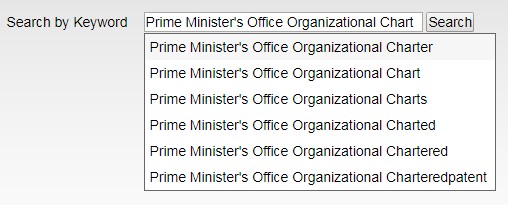
Suggest Feature
Search keywords are analyzed in real time and a refined set of keywords is suggested based on the context of the web text.

Display Settings
You can set the following options to control the display of search results.
- Display order
- By highest relevancy (default option)
- Oldest dates first
- Newest dates first
- PDF files
- Include in search
- Exclude from search
- Display count
- 10 results
- 30 results
- 50 results
- 100 results
Usage Example
You can perform complex searches by combining the AND / OR / ANDNOT conditions with other features.

In this example, the search will find text that contains both "Keyword1" and "Keyword2", but not "Keyword3".
